
Automations Low-Code Engine
The low-code engine that powers every workflow — whether kicked off from Mesh, driven by external events, or scheduled on a timer. Design, orchestrate and run multi-step processes from a single browser-based canvas.
What is Automations?
Automations is the low-code engine that powers every workflow — whether kicked off from within Mesh, driven by external events, or scheduled on a timer. It lets you design, orchestrate and run multi-step processes across all your data sources, AI-agents, notification channels and line-of-business systems, all from a single browser-based canvas.
Calculate Your ROI
See the financial benefit of replacing multiple Vault Job Processors with MinuteView Automations. Get instant ROI, cost savings, and payback period based on your environment.
Try ROI CalculatorThe Challenge
Organisations operate across a growing number of systems yet their processes remain fragmented and manual
Every day, critical workflows rely on people switching between applications, re-entering data, and managing files through repetitive steps prone to error. These inefficiencies create real problems:
Delays in Approvals & Handovers
Document approvals, handovers, and reviews are slowed by manual processes and disconnected systems.
Repetitive Manual Tasks
Engineering and admin time is drained by repetitive tasks that could be automated.
Missed Updates & Inconsistencies
Data across systems falls out of sync, leading to errors and rework.
Expensive Developer Input
Custom workflows require expensive developer input, creating backlogs and delays.
The result? Valuable time is wasted, processes are delayed, and data accuracy suffers — despite significant investment in digital platforms.
The Solution: Automations
Low-code/no-code engine that powers every workflow across your business
Whether triggered by an event in Mesh, an update in Vault, or a scheduled process overnight, it orchestrates complex, multi-system actions from one central interface — no coding required.
Flexible Triggers
Thousands of out-of-the-box connectors detect events in real-time and trigger workflows automatically.
Mesh-Driven Commands
Trigger from a document search or AI chat interaction
Source-Native Events
- •File approval in Autodesk Vault
- •Document change in Autodesk Construction Cloud
- •Folder creation on a network drive
Time-Based & Conditional Logic
- •Nightly batch exports
- •Alerts for drawings with no updates for X days
Browser-Based Workflow Builder
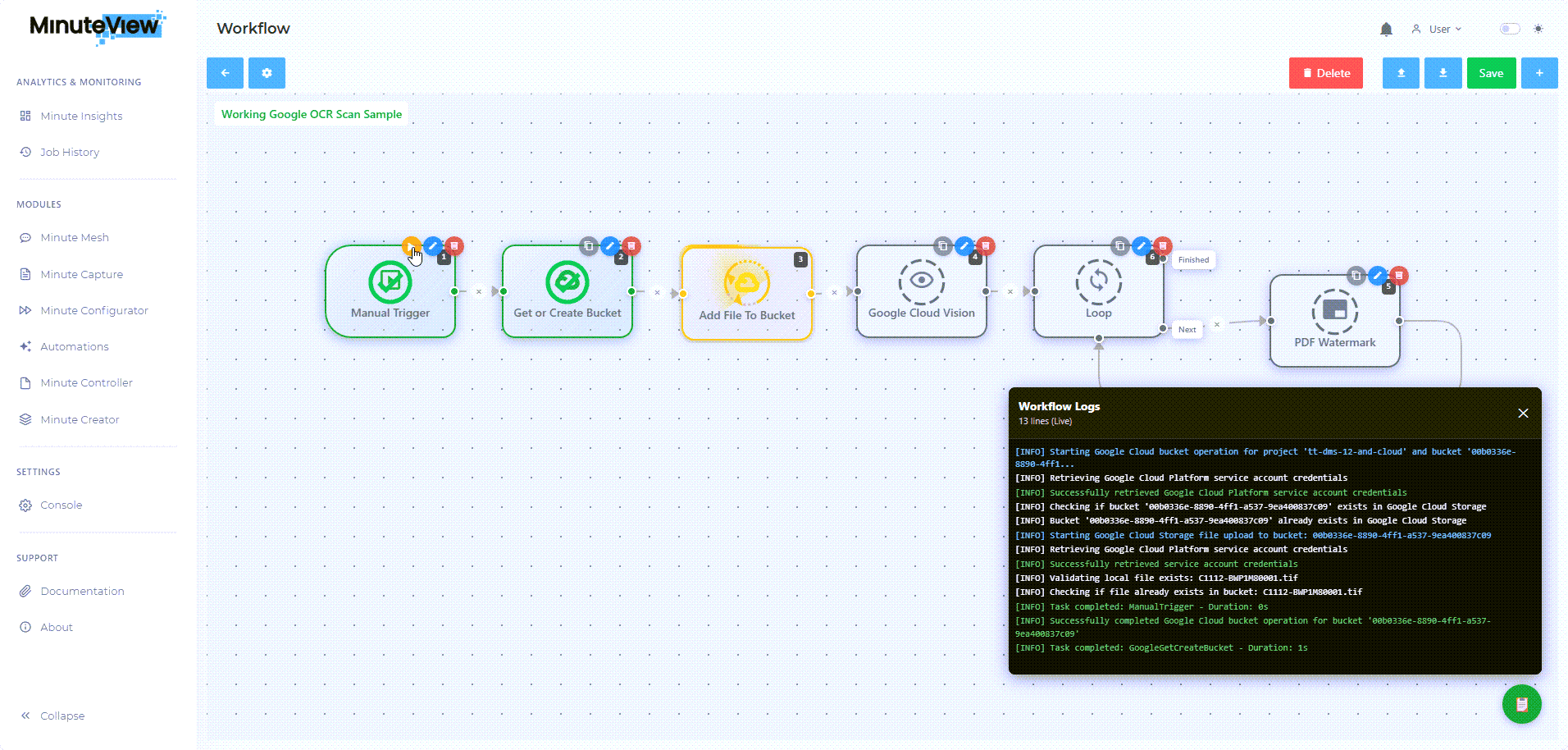
Design rich, multi-step workflows in your browser using drag-and-drop logic.
Visual Logic
Stack tasks, loops, and branches with drag-and-drop simplicity
Built-in Tasks
File ops (copy, move, rename), data transforms (CSV ↔ JSON, Excel edits), notifications (email, Teams, calendar)
AI-Powered Steps
Summarise documents, classify by project or discipline, route based on sentiment
Custom Code Nodes
Write and debug PowerShell or custom scripts inline — fill any functional gap with your own logic or API calls
Integrations
Connect seamlessly to your existing systems
Engineering Platforms
Enterprise Systems
Custom APIs & Webhooks
Key Benefits
Measurable improvements to your engineering operations
Automate Repetitive Tasks
Free up engineering resources from manual file handling
Cross-System Orchestration
Seamless data flow between CAD, PLM, ERP, and BI platforms
Rapid Time-to-Value
Build and deploy new workflows in minutes, not months
AI-Enhanced Intelligence
Embed document summaries, anomaly detection and smart routing into every process
Unlimited Extensibility
Inline PowerShell (or custom code) nodes let you do anything a script can do
Why Automations?
Transform fragmented manual tasks into streamlined, intelligent processes
Eliminate Manual Tasks
Free up engineering and admin teams from repetitive work
Synchronise Systems
Automate data flow between CAD, PLM, ERP, and BI platforms
Deploy Fast
Launch workflows in minutes with no developer backlog
Drive Intelligence
AI agents embed smart routing, classification, and insights
Unmatched Flexibility
Add scripts, connect new apps, and adapt as your needs evolve
MinuteView Automations transforms fragmented manual tasks into streamlined, intelligent processes — accelerating time-to-value while reducing risk and effort.
Ready to Automate Your Workflows?
See how Automations can eliminate manual processes and connect your engineering systems.